Atlas by TBP · Event operations platform

Every crew, accounted for.
Every incident, on record.

Atlas is the platform TBP runs its event operations on. crew.Atlas recruits, screens, presents and runs your event staff, from the first application to the final rating. at.Atlas checks them in at the venue, runs rosters and leave, and closes every month with a timesheet anyone can verify. report.Atlas lets staff report incidents from any phone and moves each case to the people who decide.

One platform

Three products, one way of working.

All three share the same sign-in style, the same Saudi-time clock, the same audit trail and the same team behind them. Use one, or run them together on the same event: the crew you deploy through crew.Atlas check in with at.Atlas and report through report.Atlas.

Works on any phone, no app to install Saudi time throughout Every action on record Set up per event, per client

The event workforce, from first application to final rating.

Know who is coming, approve who works, and see who turned up.

crew.Atlas covers the whole life of an event team. Every step has its own screen, and the client sees the parts meant for the client: the proposed team, the approval page and the evaluation after the event.

  1. 01RecruitPublic job links and an applicant pipeline
  2. 02InterviewAI voice interview with an English level
  3. 03PlanDays, venues, shifts and head-counts
  4. 04PresentA team page for the client
  5. 05ApproveThe client approves or declines each person
  6. 06Run the dayLive check-ins, lateness and no-shows
  7. 07EvaluateThe client rates every person afterwards

Highlighted steps are the pages your team uses directly.

01 · Recruit

A job link that works on any phone.

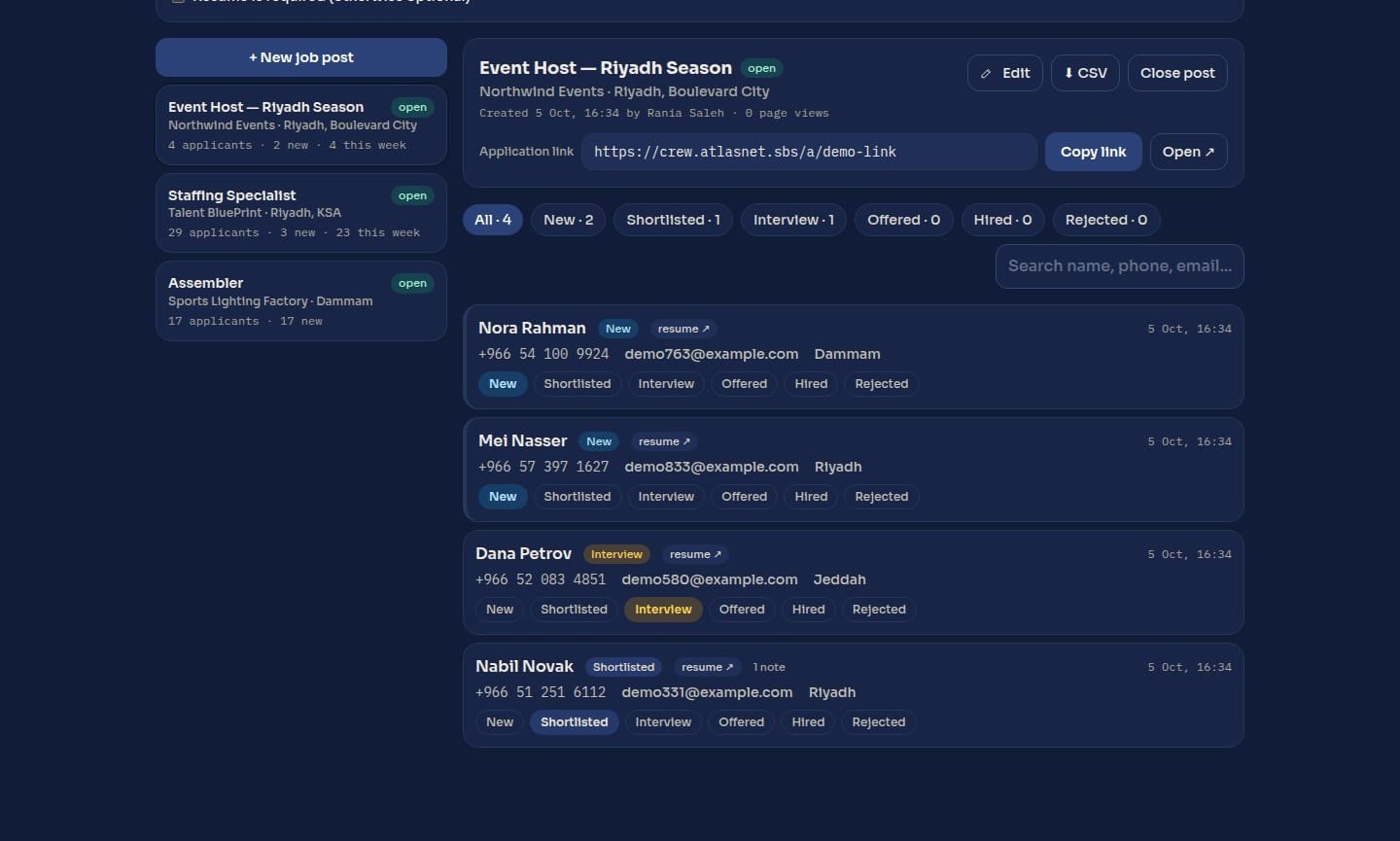
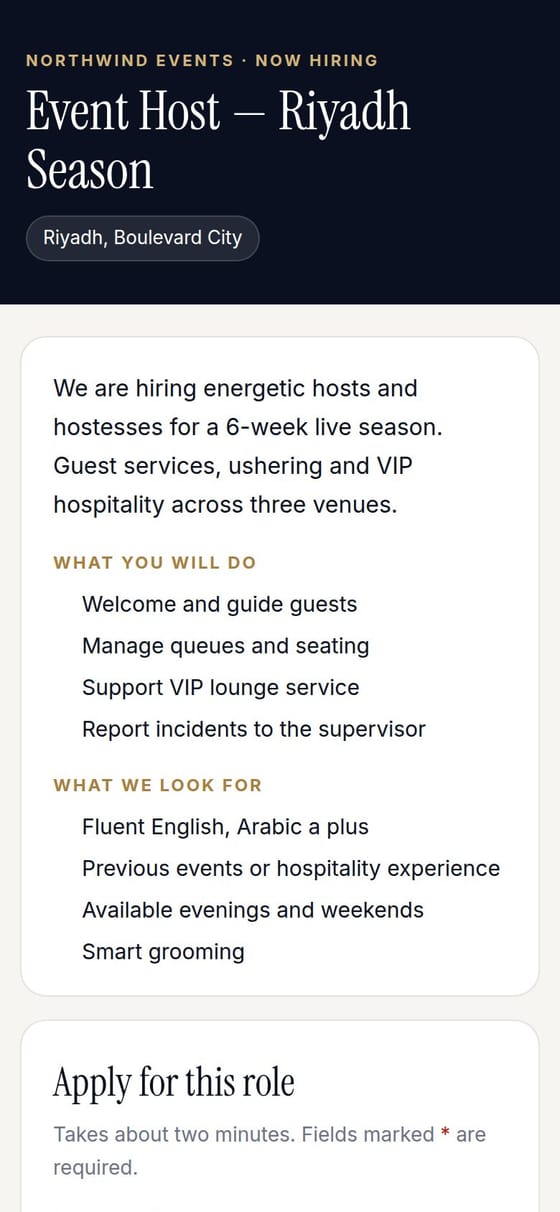
Each role gets its own public advert with an application form. Applications land in a pipeline the staffing team works through.

  • Screening questions per role. Yes/no, multiple choice and written answers, plus an optional CV.
  • One pipeline. New, shortlisted, interview, offered, hired or rejected, one tap per move, with notes and a full history.
  • Matched to the crew database. Returning applicants are recognised by phone or email, so nobody is vetted twice.
The applicant dashboard with job posts and pipeline
The public job advert and application form on a phone
02 · Interview

Every candidate interviewed, at any hour.

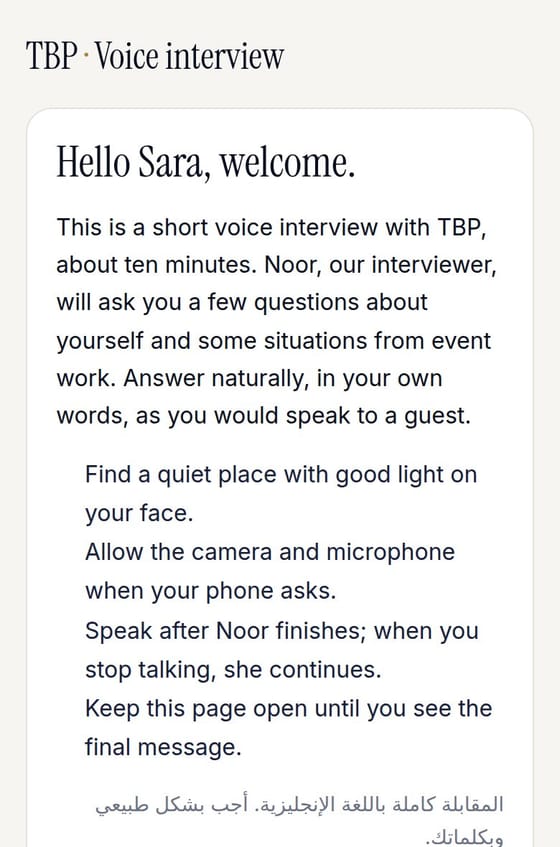
Candidates open a link and talk to Noor, our AI interviewer, for about ten minutes in English. No scheduling, no interviewer on the call.

  • Real conversation, real situations. Questions about their experience, event-floor scenarios and a sentence to read aloud.
  • Scored the same way every time. An English level on the CEFR scale (A1 to C2), a service-judgement score and a recommendation.
  • Checked for integrity. The face on camera is compared with the profile photo, and the recording and transcript are kept for review.
The interview welcome screen on a phone, in English with an Arabic note
Sample scorecardProceed
Candidate · Event Host
B2English level
Upper intermediate
English
72/100
Service judgement
8/10
Integrity
Low risk
Face match
Same person
Recording · transcript · reviewer notes
03 · Plan

Every day of the event, planned before it starts.

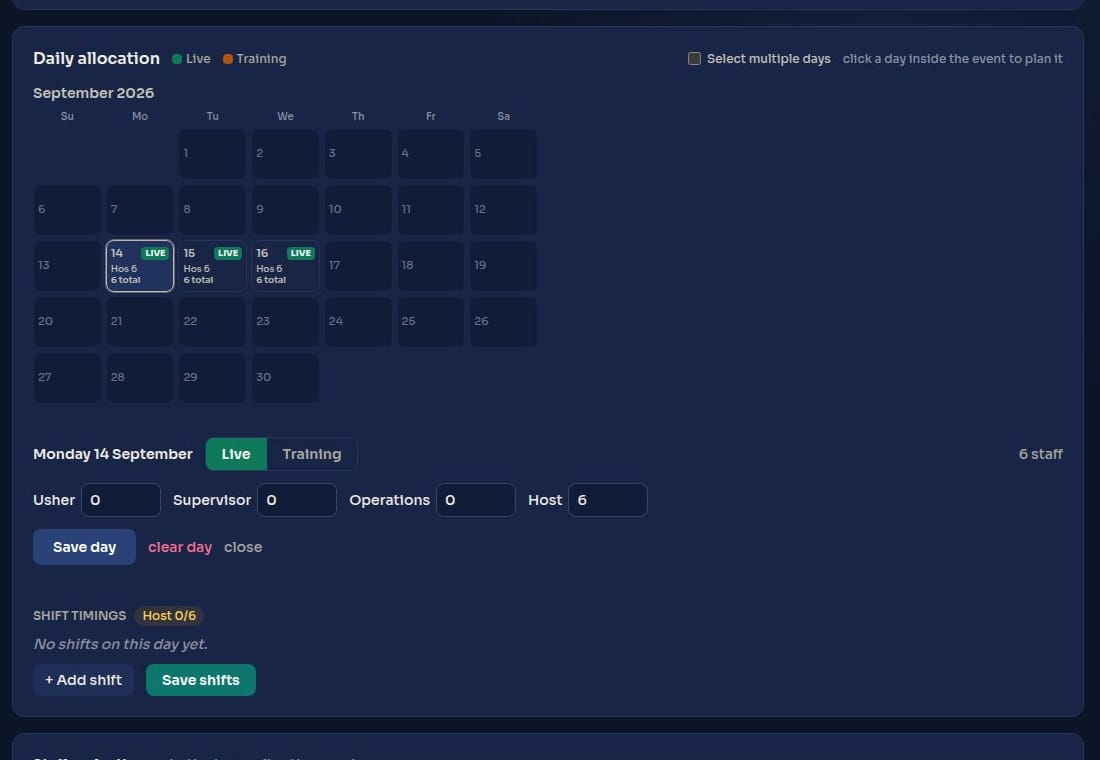
A project holds the client, the event window, the venues and the staffing request. Each day is then planned in two steps: how many people, then which shifts.

  • Head-count per role, per day. Live days and training days, for hosts, supervisors or any role you need.
  • Shifts across venues. Plan one day, or apply the same plan to many days at once.
  • Gaps flagged early. A day whose shifts don't add up to its head-count is flagged straight away.
Planning a day: allocation per role and shifts per venue
04 · Present

Meet the team before the event.

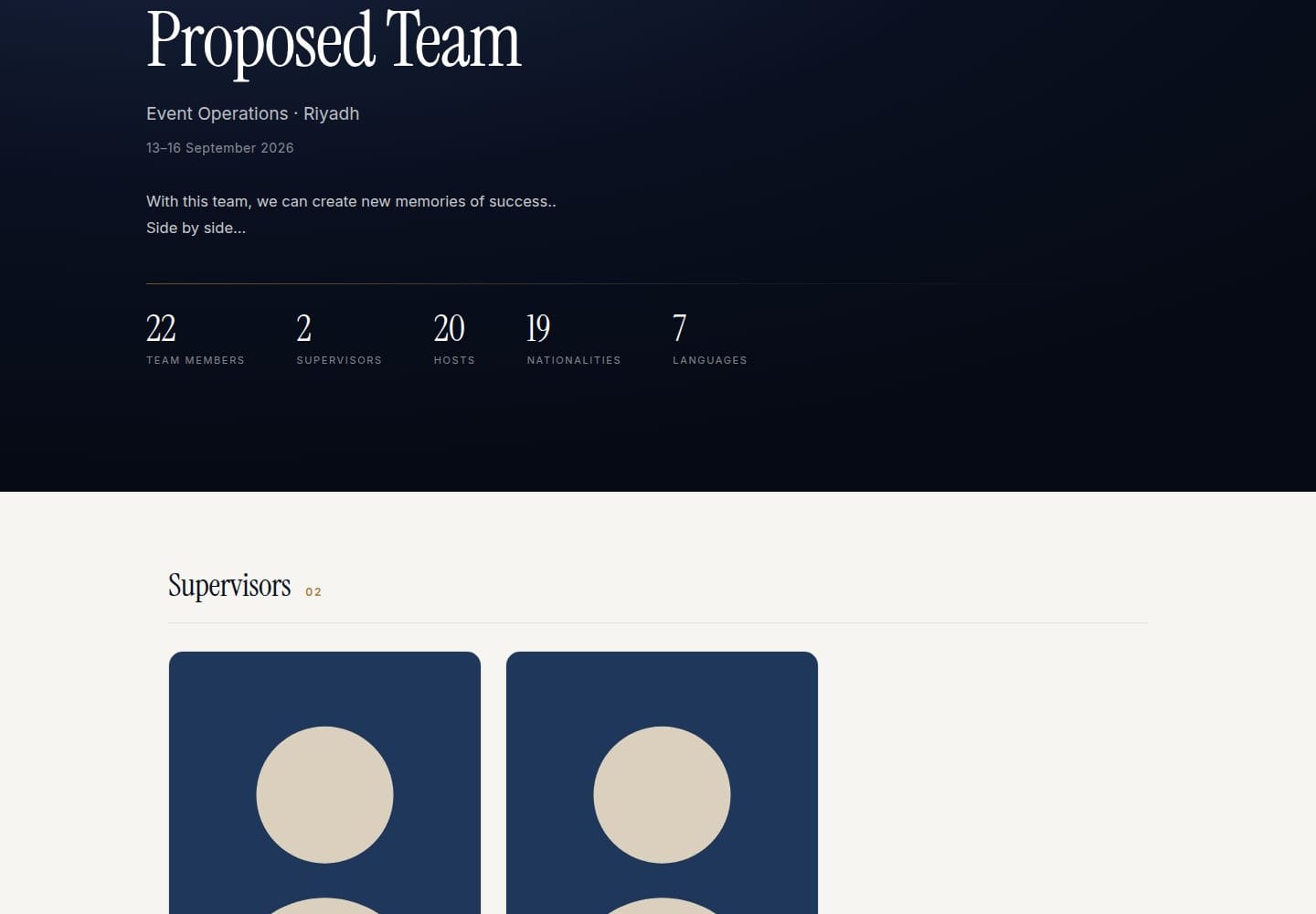
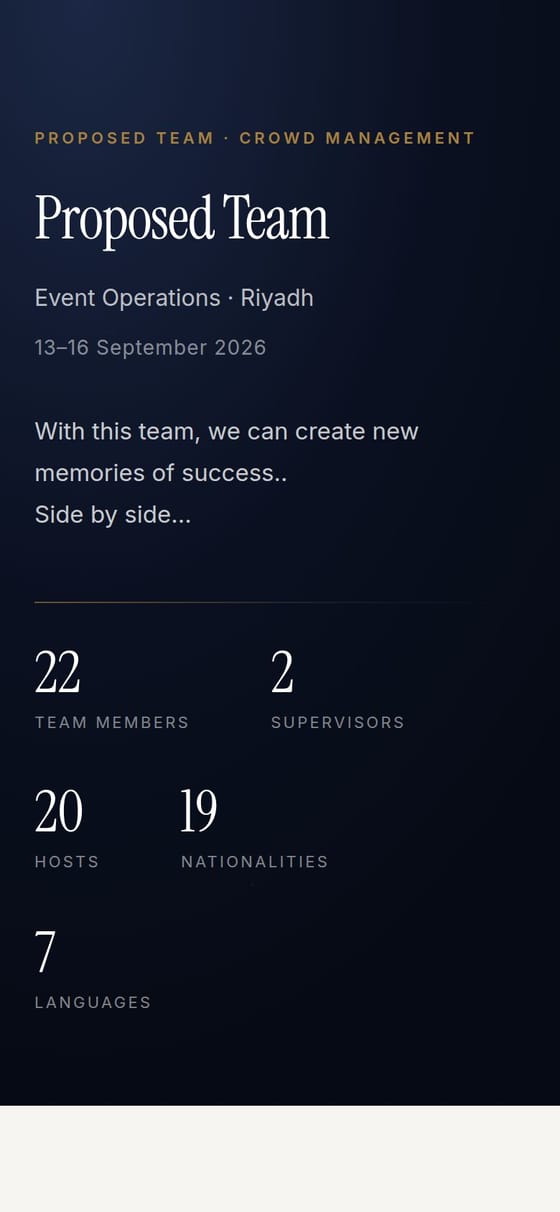
We send you a page that introduces the proposed team: portraits, a short bio, experience highlights and languages, grouped by role with supervisors first.

  • Written for you, checked by us. Bios are drafted from each person's record and edited by the staffing team before you see them.
  • A live page, not a PDF. Swap a person and the page updates. It still prints cleanly when you need a copy on file.
  • Private and revocable. Internal notes never reach the page, it is never indexed by search engines, and the link can be switched off in one click.
The client team page with summary and role-grouped crew cards
The client team page on a phone
05 · Approve

Approve or decline each person, with a reason on record.

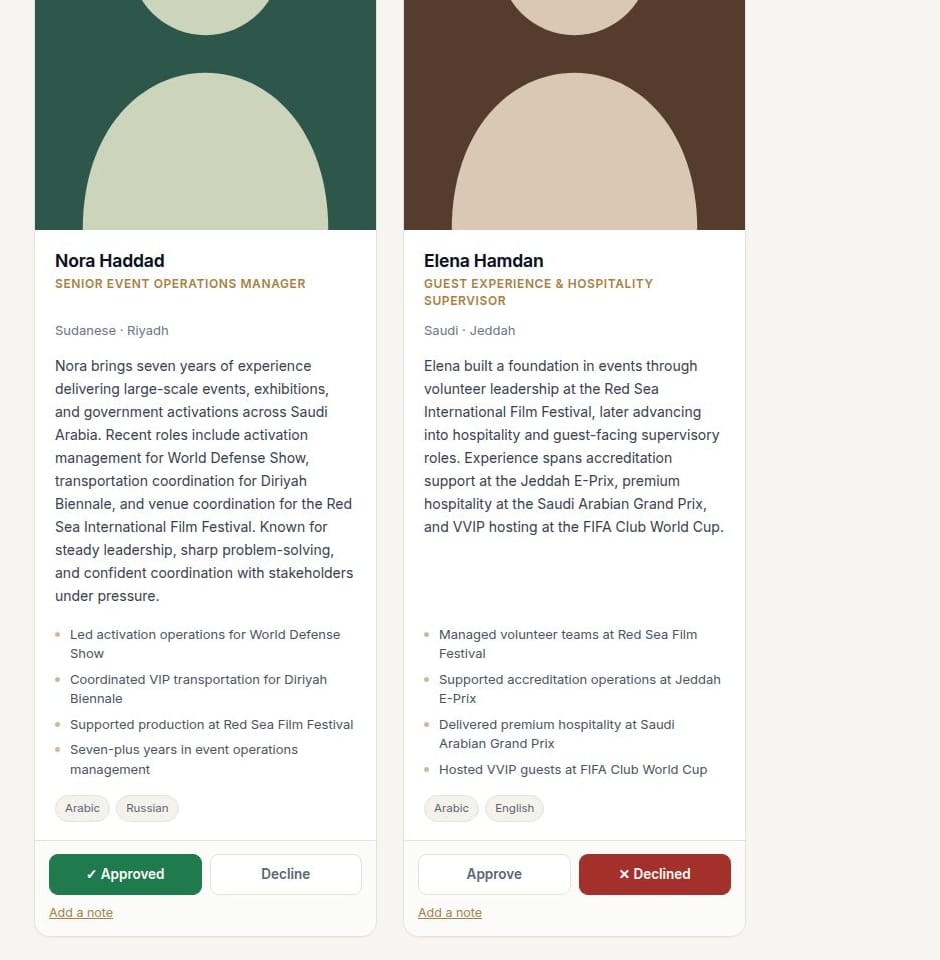
The same team page, behind a sign-in for the reviewers you name. Under every card: approve, decline or comment.

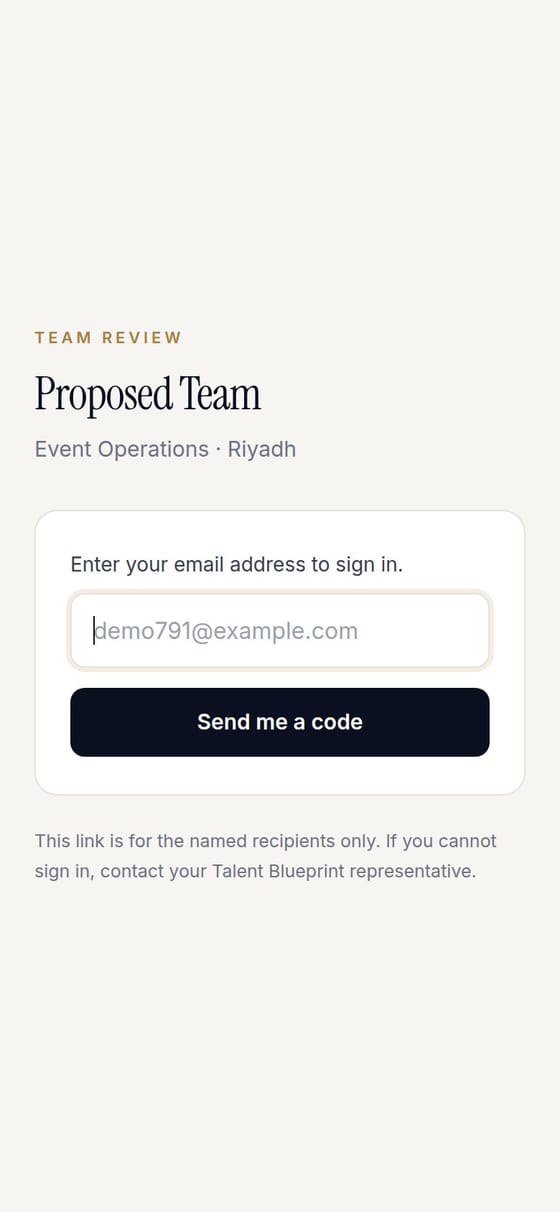
  • Sign in with an email code. Only the addresses on your list receive a code. A forwarded link opens nothing.
  • Our team hears about a decline straight away. A replacement can be on the page before the next review round.
  • Every verdict is kept as you saw it. If a card changes after your decision, it is marked as changed.
The client review page with approve and decline under each person
Reviewer sign-in with an email code
06 · Run the day

Who is in, who is late, who is missing. Live.

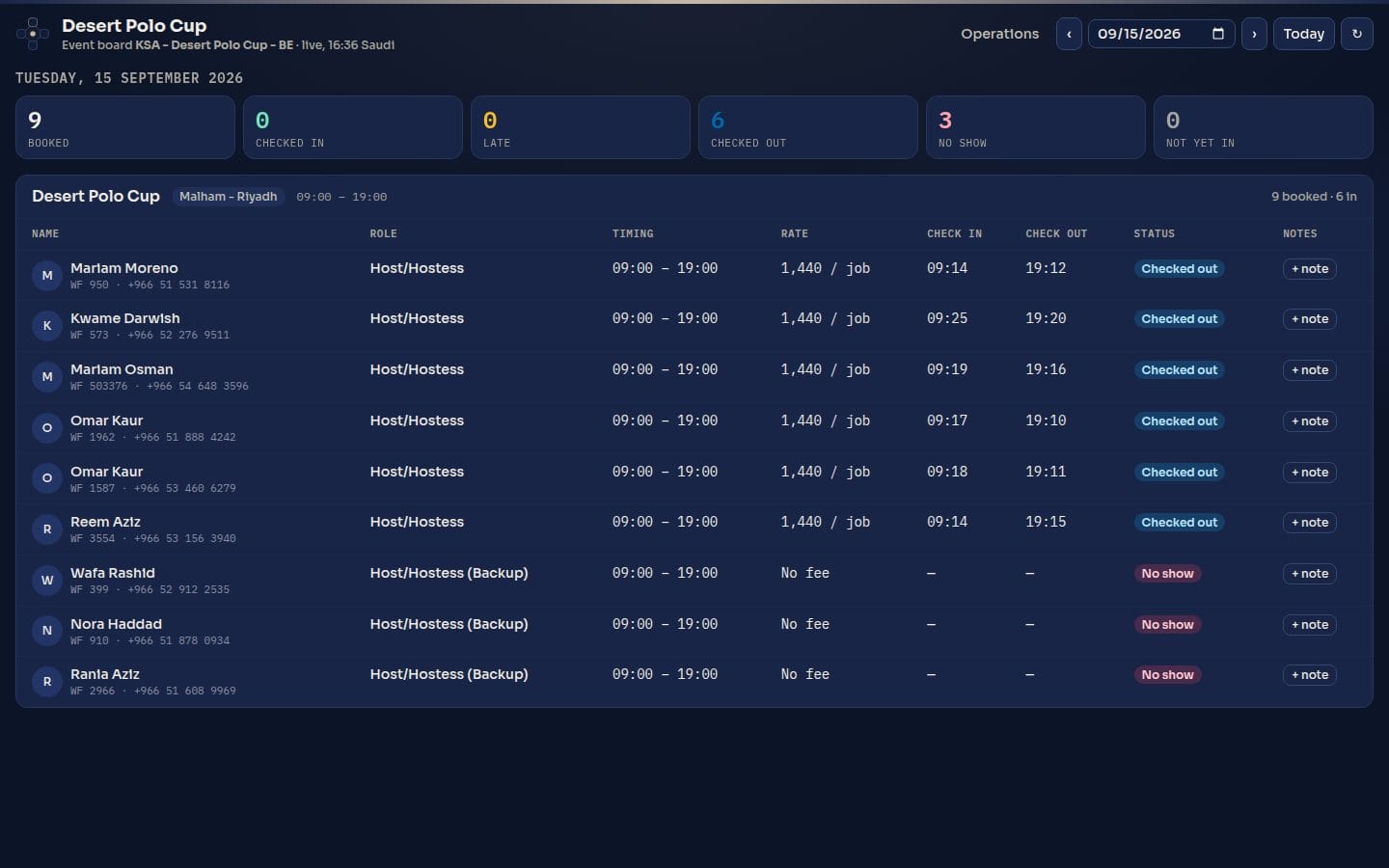
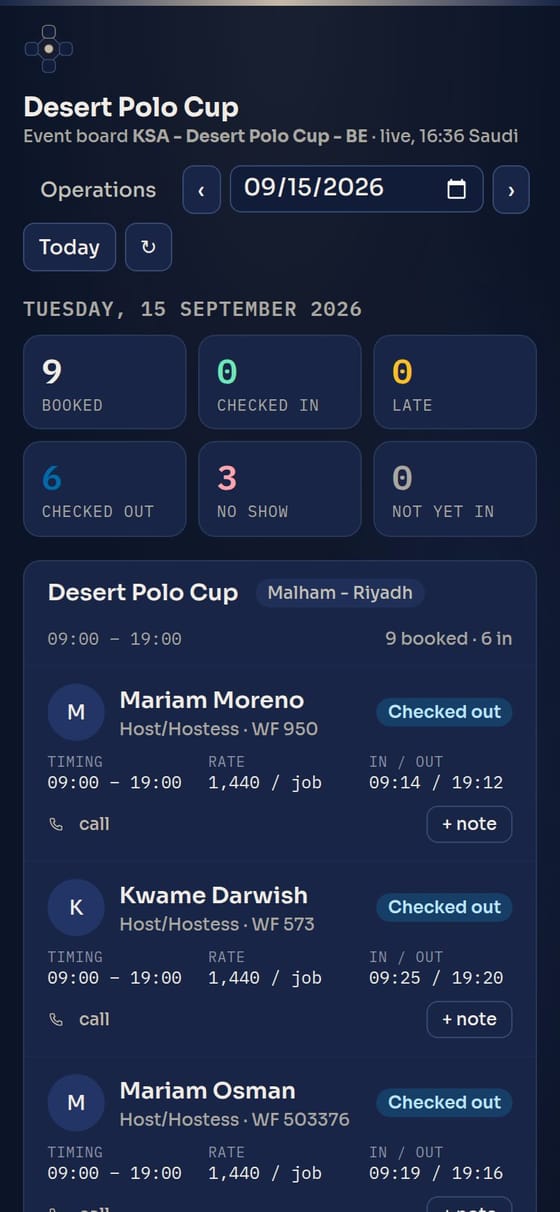
On event day the operations manager works from one board: every booked person, grouped by job with supervisors first, with their check-in and check-out times.

  • Counters at the top. Booked, checked in, late, checked out, no-show and not yet in.
  • Refreshes every minute. On a laptop at the venue office or on a phone on the floor.
  • Notes on people. Mark good work, a note or an issue against a person for that date. It stays on their record for the next event.
The live board with counters and check-in times
The live board on a phone
07 · Evaluate

Rate every person once the event is over.

You get one link. Each reviewer gives their name and rates the team on a phone, one person at a time.

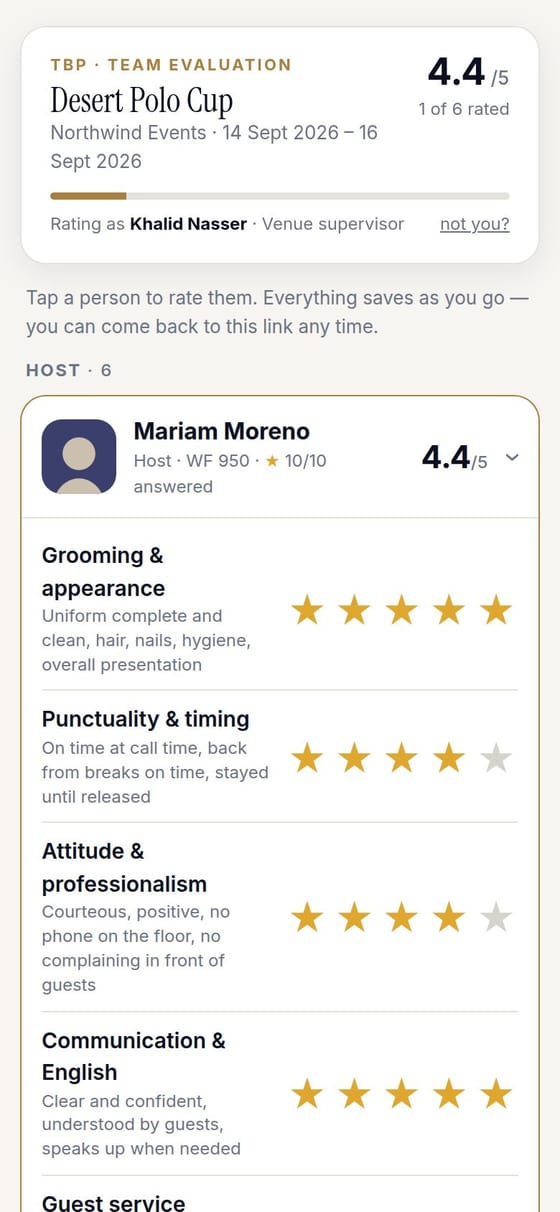
  • Ten criteria, one to five stars. Grooming, punctuality, attitude, communication and English, guest service, teamwork, following the briefing, initiative, energy and reliability.
  • "Would you have them again?" Plus incidents and comments, saved as you go.
  • Ratings stay with the person. Several reviewers can rate on one link. Results go onto each person's record and shape the next team we propose.
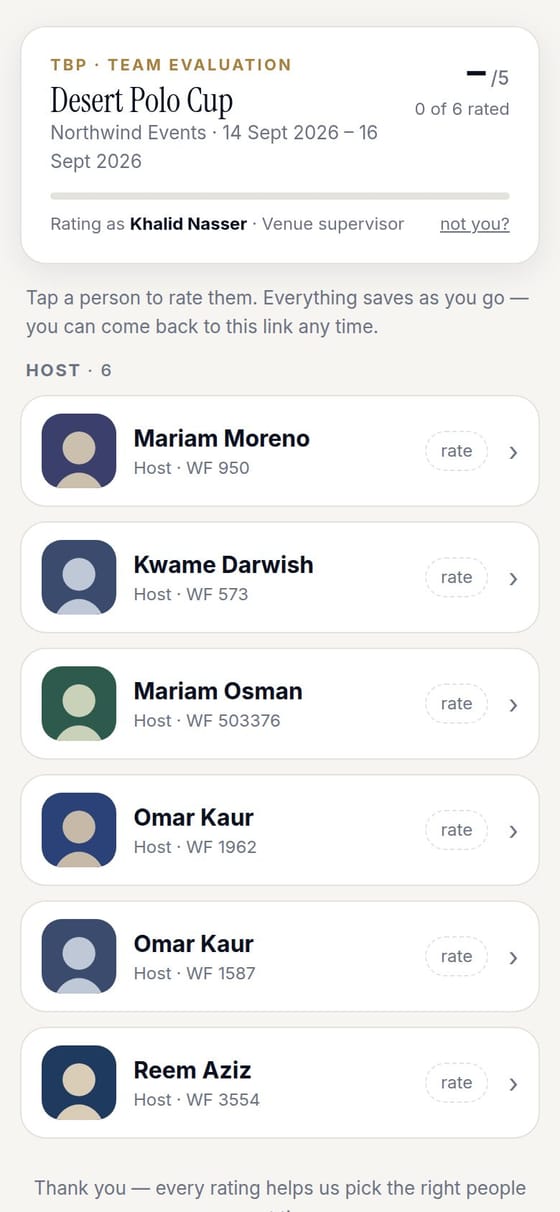
The team to rate, with a running score
The team, with a running score
Rating one person on ten criteria
Ten criteria per person

A crew database we keep clean

Our staffing team checks every profile: photos, ID documents, contact details and skills. Problem profiles are followed up until they are fixed.

Everything on record

Who changed what, and when, in Saudi time. Approvals, ratings and notes stay attached to each person.

Crew briefed where they already are

Interview invites and team groups go out on WhatsApp, the app your crew already use every day.

Every shift, accounted for.

Who is on shift, who is late, and timesheets nobody can quietly change.

at.Atlas runs attendance for event and office teams alike. Staff check in from their phone at the venue, managers approve leave and corrections with the evidence in front of them, and every month closes with a timesheet you can prove has not been altered.

GPScheck-in at the venue. The site decides onsite or remote
Livewho is on shift, due in or late, refreshed every minute
2 stepsleave and corrections: the manager, then the final sign-off
1 codeon every exported timesheet, checkable by anyone
On the staff phone

Check in at the venue, in one tap.

  • GPS check-in at the venue. The site's boundary decides whether the day counts as onsite or remote. Nobody picks it for themselves.
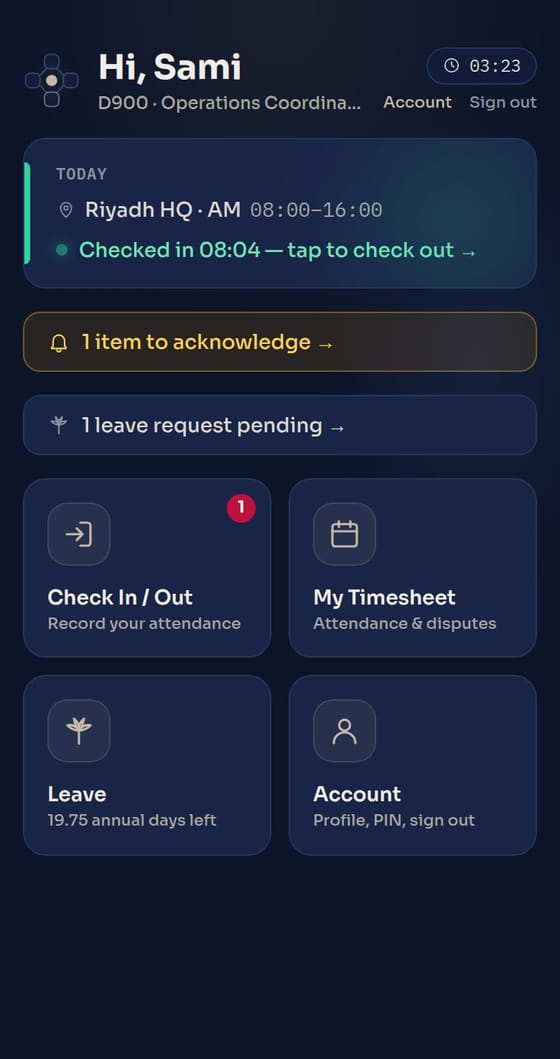
  • Today's shift on the home screen. Named shifts such as AM 08:00–16:00, the published roster and anything waiting to be acknowledged.
  • Flexible schedules too. Staff without fixed shifts check in and out several times a day. Every session is logged and the hours add up on their own.
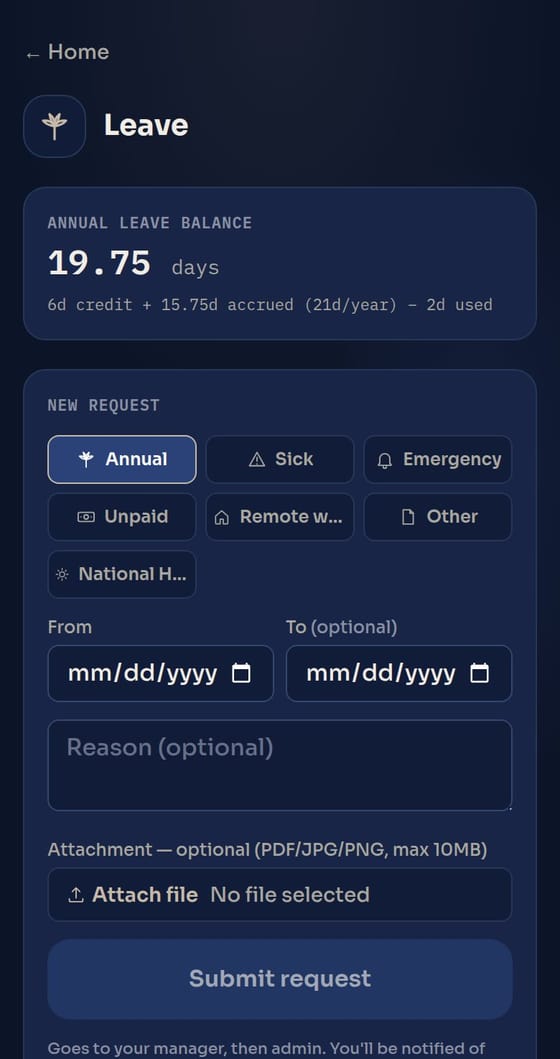
  • Leave from the phone. Annual, sick, emergency and more, with a live balance and an optional attachment.
The staff home screen with today's shift and check-in status
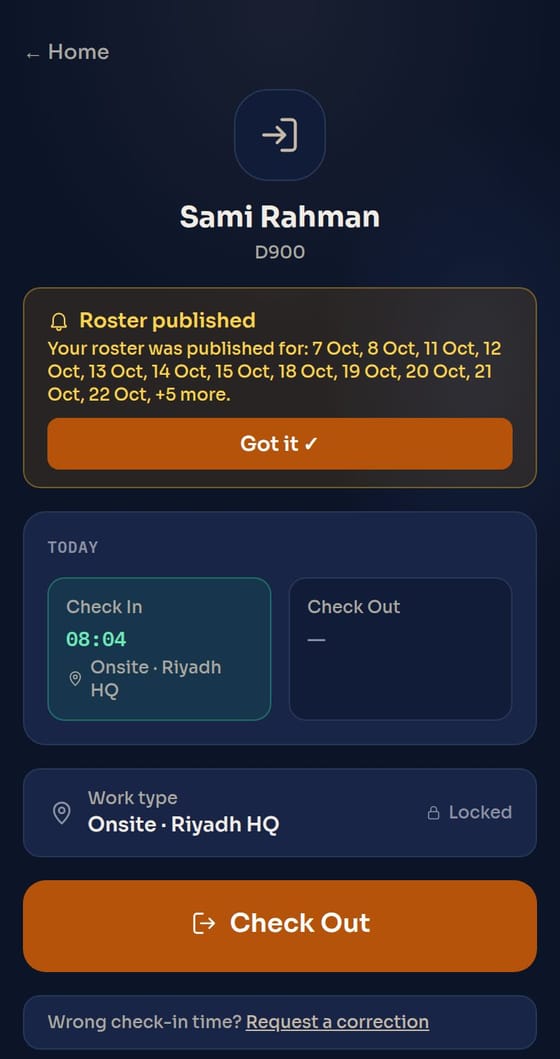
Today's shift
Checked in onsite at the venue, with the check-out button
Onsite check-in
A leave request with the annual balance
Leave and balance
Rosters and the live board

Plan the month, then watch the day.

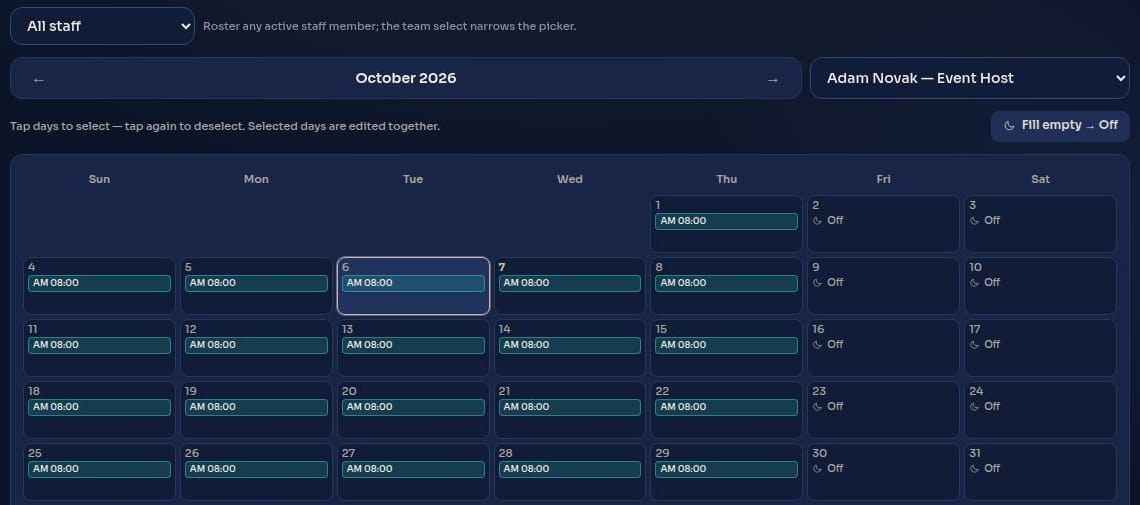
  • Rosters with named shifts. Pick days on a calendar, set the site and the shift, repeat a pattern. Staff are told once, when the roster is published.
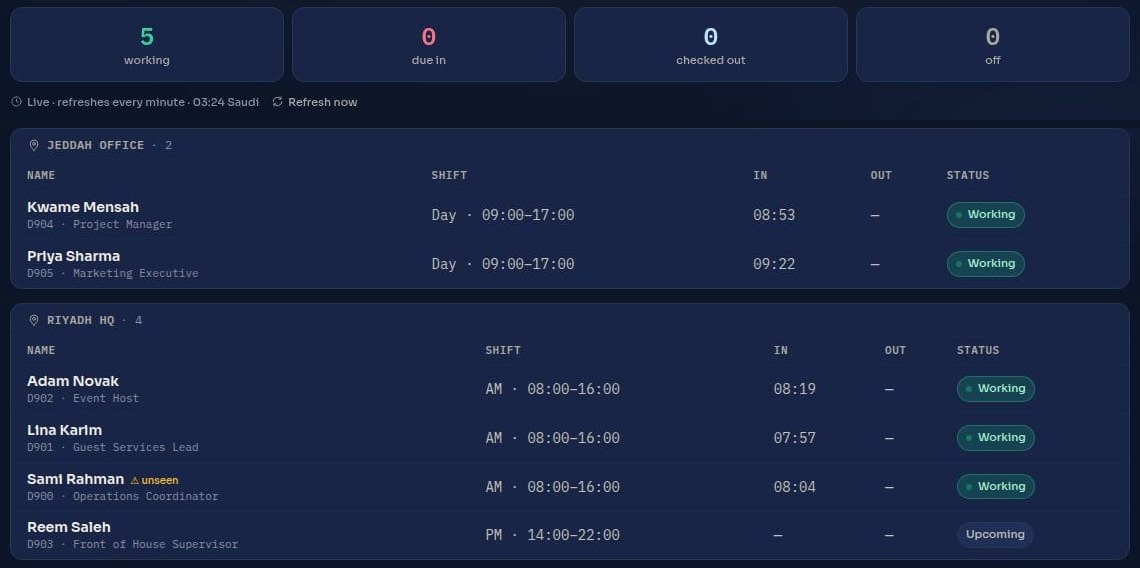
  • A live board per site. Who is working, due in, checked out or off, grouped by venue and refreshed every minute.
  • Late and missing at a glance. A shift that has started without a check-in stands out straight away.
The live board grouped by site, with shift, check-in time and status
A month roster for one person, with named shifts per day
Approvals

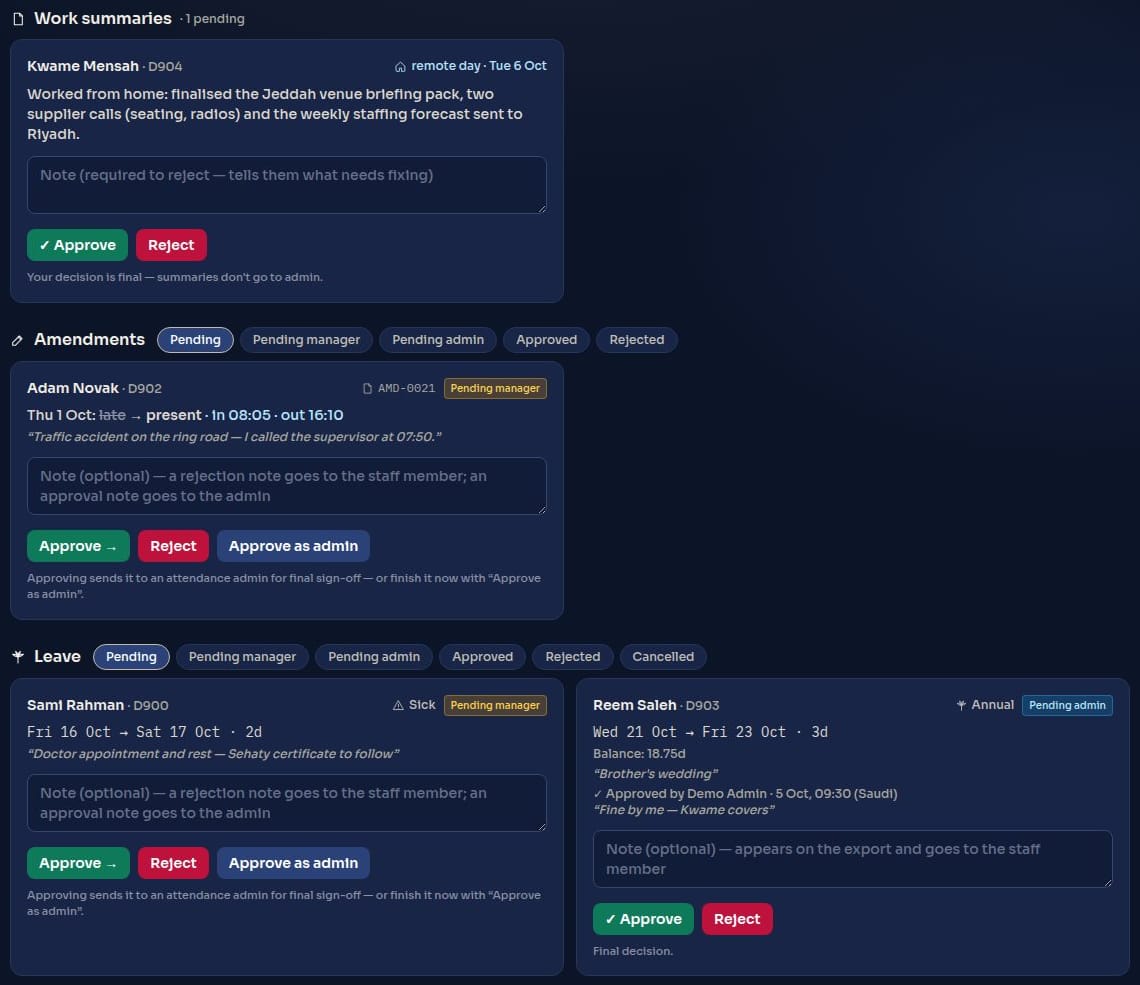
Leave and corrections, approved in two steps, with the evidence attached.

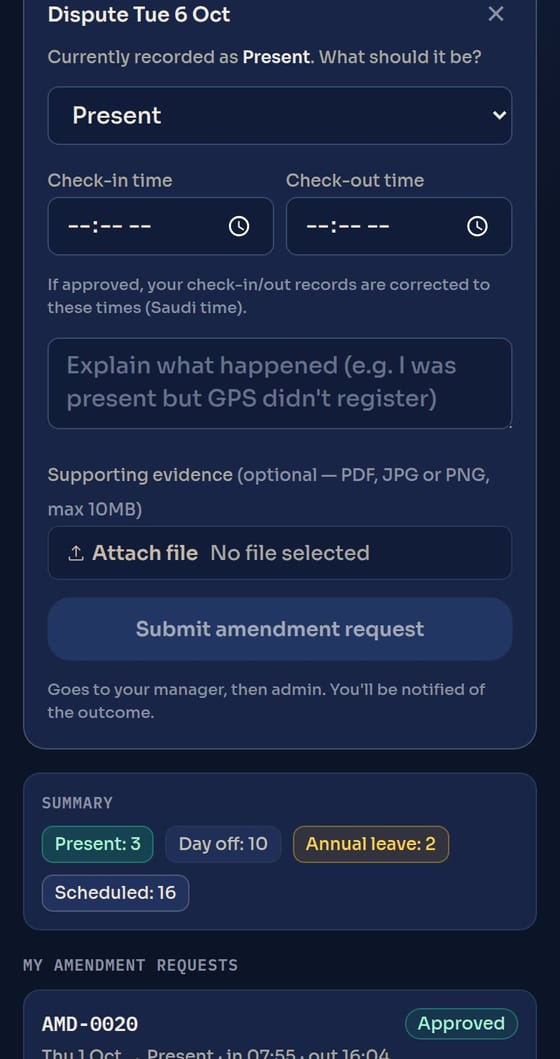
  • Staff explain, and attach proof. A wrong time or a missed check-in becomes a correction request, with a reason and a PDF or photo.
  • The manager first, then the sign-off. The line manager approves or rejects with a note, and an attendance admin gives the final approval.
  • Corrections reach the timesheet. An approved correction updates the day and is marked on it, with the case number kept.
The approvals queue: work summaries, corrections and leave
A staff member requesting a correction with evidence
Analytics

Know who is reliable before the next event.

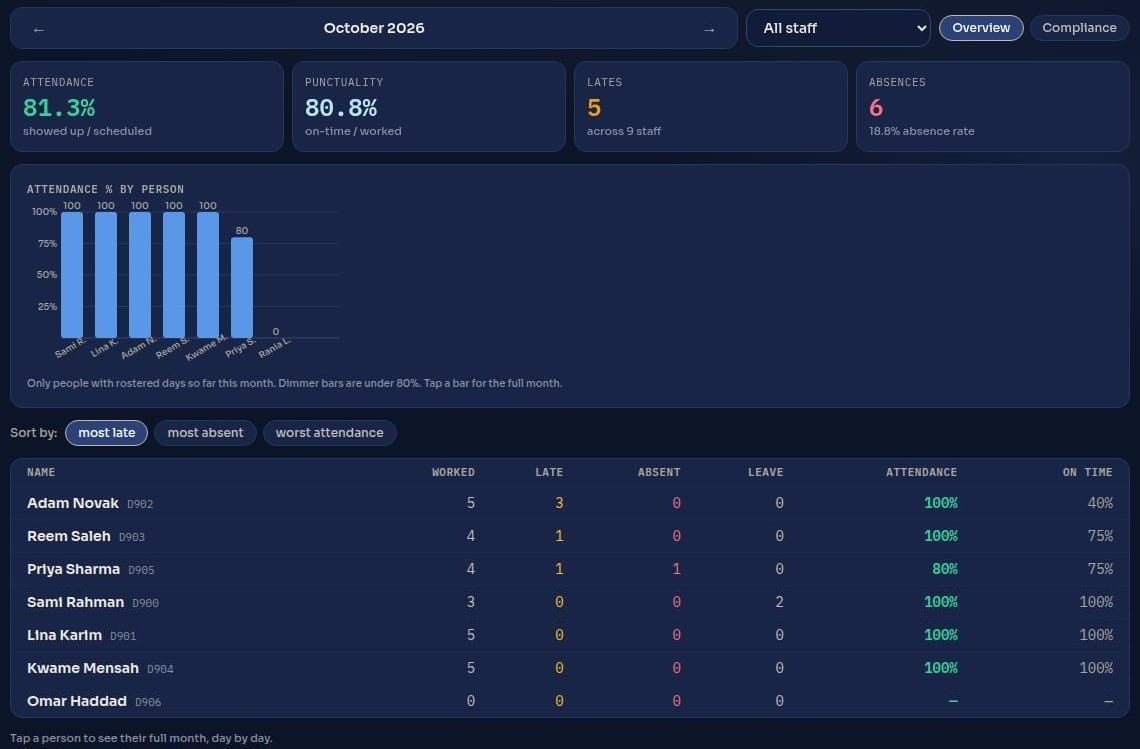
  • Attendance and punctuality. Attendance %, on-time %, lates and absences for the month, for the whole team and per person.
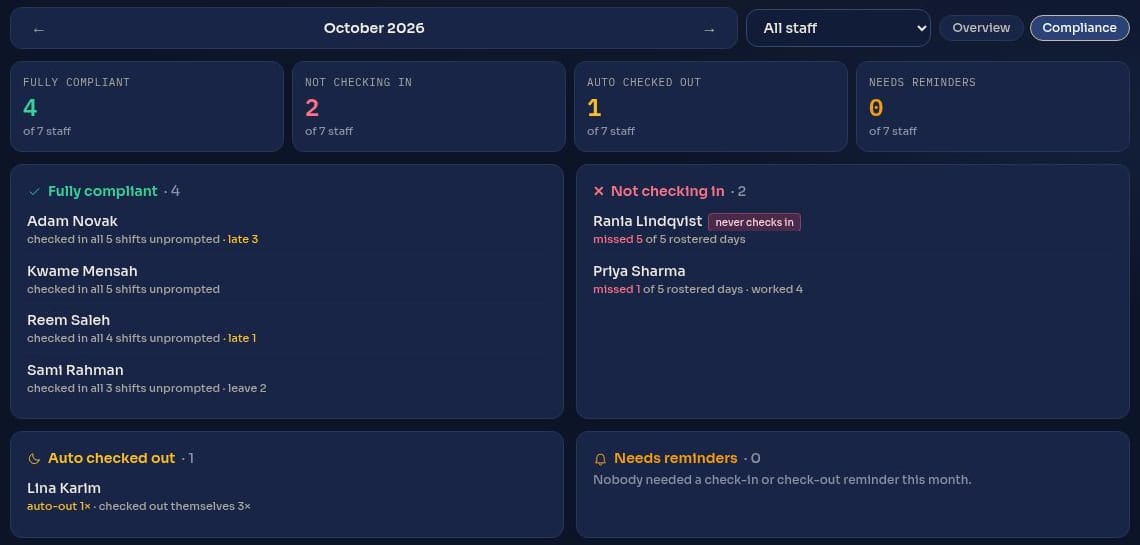
  • Compliance. Who checks in on every shift without being reminded, who does not, and who forgets to check out.
  • One tap to a person's month. Day by day, with shifts, times and leave.
Monthly analytics: attendance, punctuality, lates and absences per person
Compliance: fully compliant staff and those not checking in
Timesheets you can prove

Every timesheet carries its own seal.

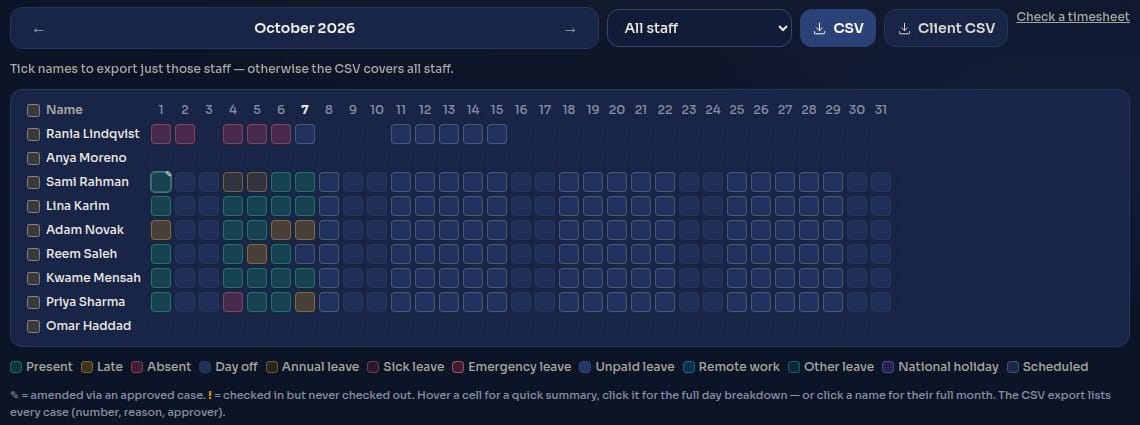
Each month closes into a timesheet, as a full copy and a clean client copy. Every exported file carries a verification code.

Verification codeATV-4F7K-92QD-M3XE
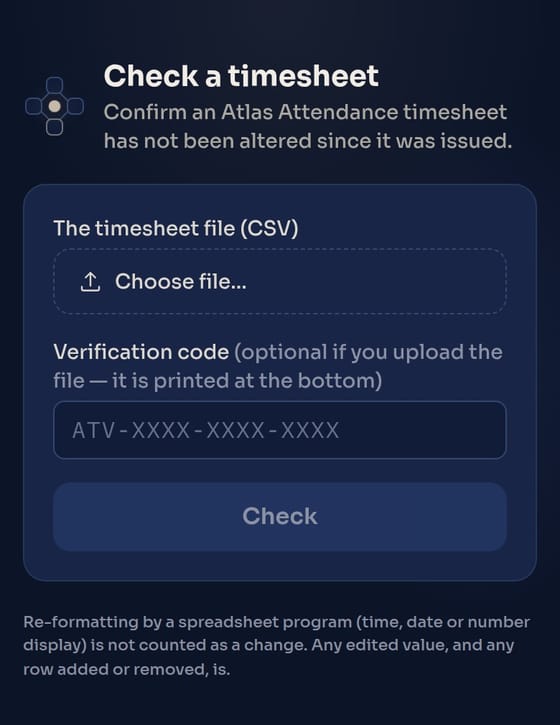
  • Anyone can check a file. Open at.atlasnet.sbs/verify, choose the file, and see straight away whether it is the original.
  • Any change shows. An edited time, a changed status, a row added or removed: the check fails. Opening it in a spreadsheet and re-formatting does not count.
  • No account needed. Your finance or audit team can verify a timesheet without signing in to anything.
The month timesheet grid with the full and client CSV exports
The public page for checking a timesheet file

View-only access for your managers

Your venue or department managers can follow the live board, rosters and timesheets without being able to change anything.

Saudi time, every record

Check-ins, approvals and corrections are kept with who did what and when.

Fixed shifts or flexible hours

Shift teams and flexible-schedule staff on the same system, each measured the right way.

Every incident on record. Escalated. Resolved.

Incidents reported from the floor, decided at the right level.

Staff report from their phone in under two minutes, with photos stamped with the exact time and GPS location, even with no signal. Each case climbs a clear route until someone closes it, and operations watch it all in one Command Centre.
< 2 minto file a report from any phone. No app to install
4 levelsStaff → Supervisor → Project Manager → Stakeholder
GPSlocation and its accuracy, stamped into every photo
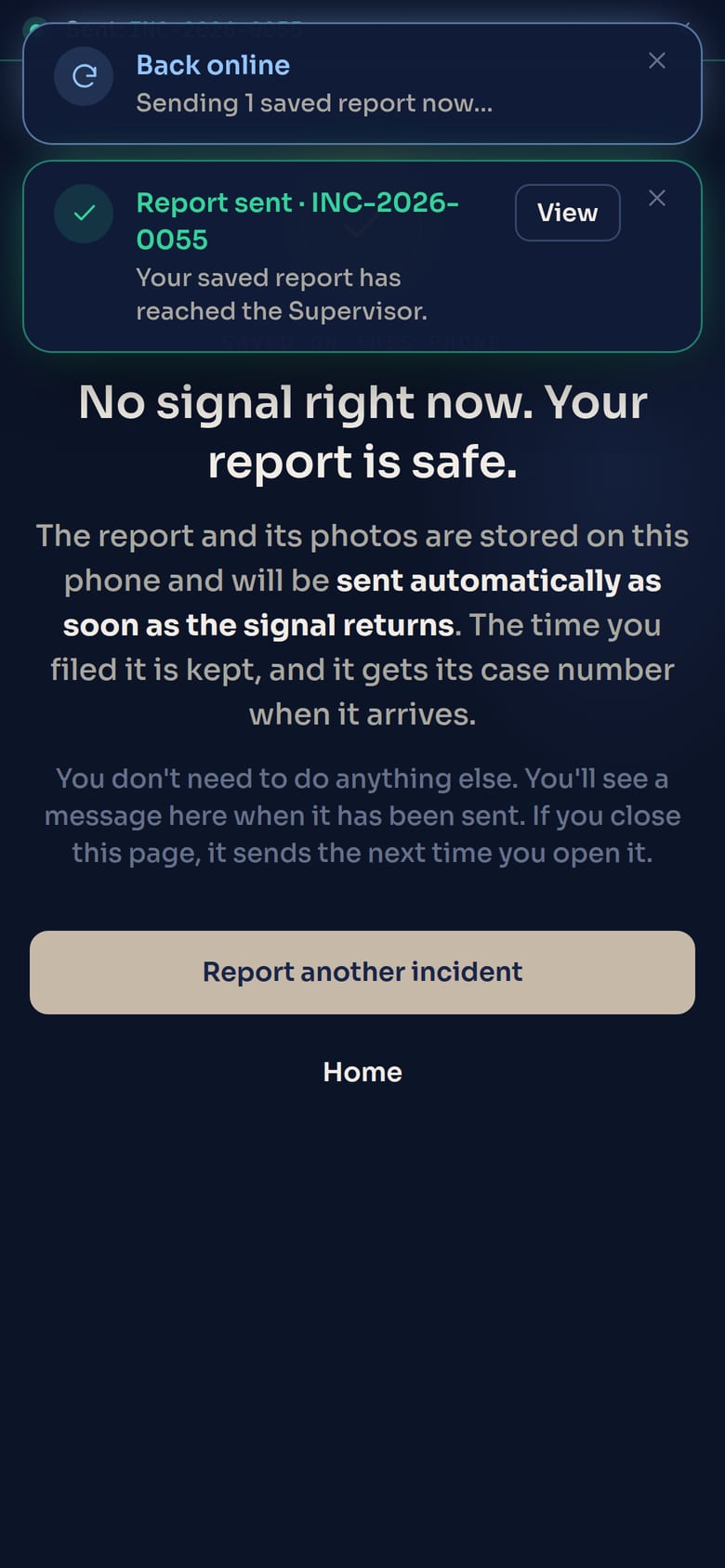
Offlinereports save on the phone and send themselves when the signal returns
Report from any phone

Two minutes, no app, and evidence you can trust.

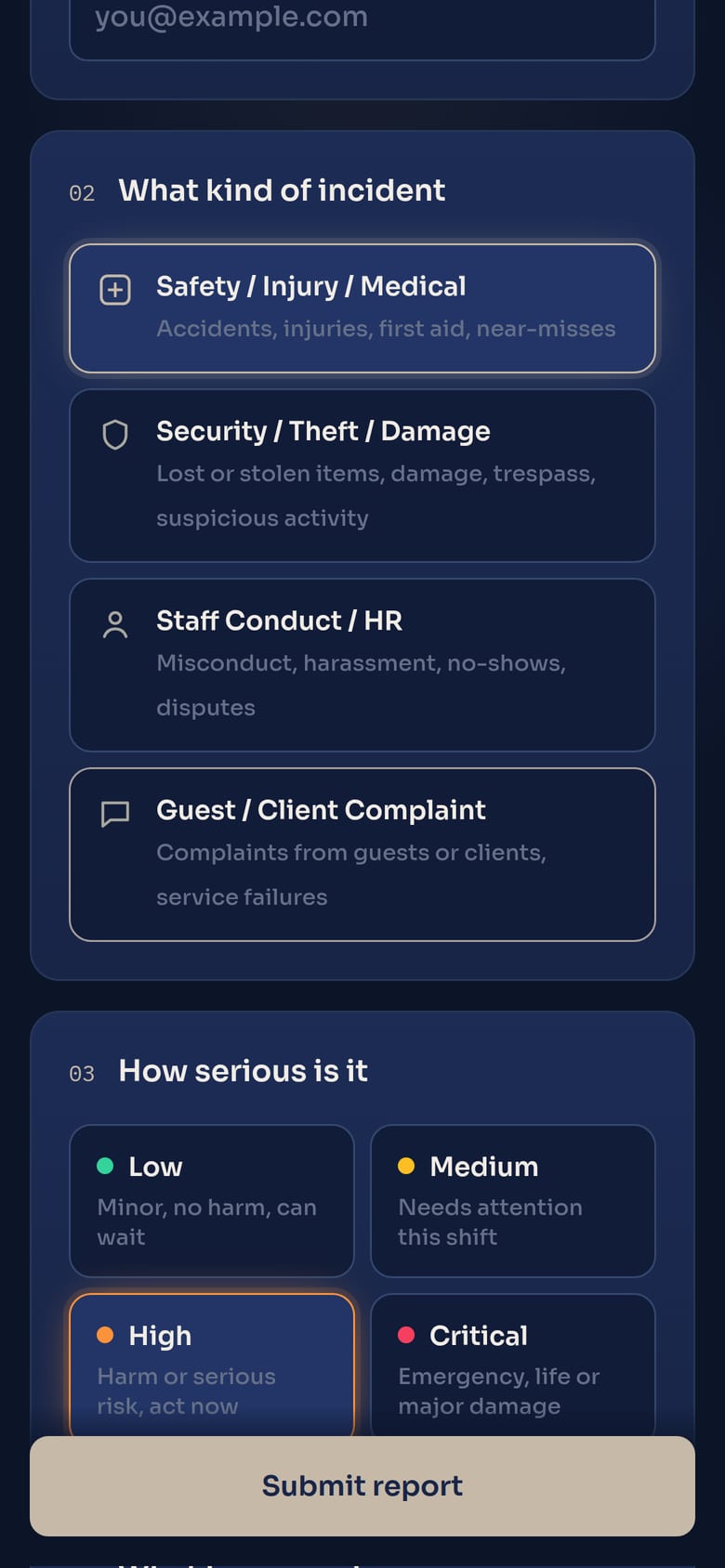
  • Category, severity, what happened. Safety, Security, Staff Conduct or Guest/Client Complaint, from Low to Critical.
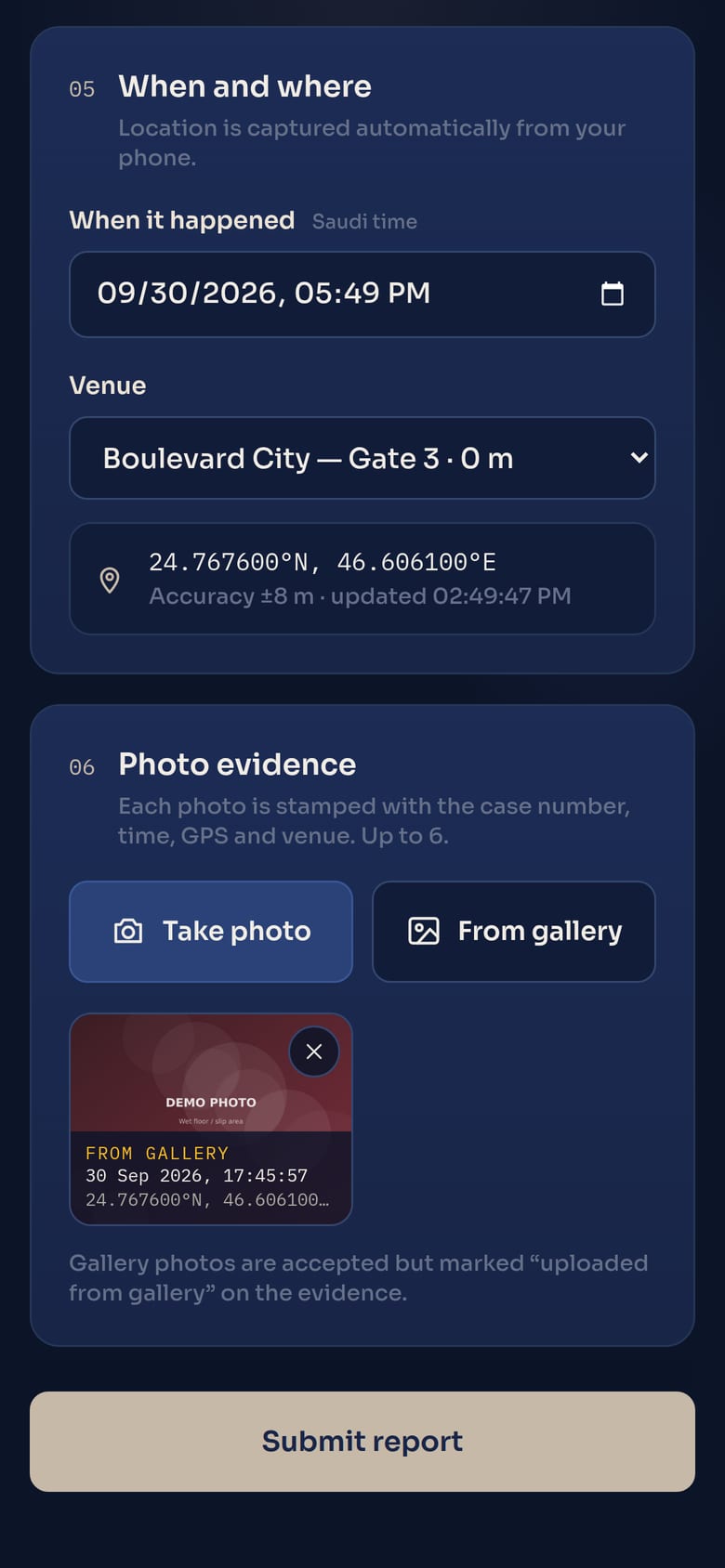
  • Photos stamped by the server. Case number, Saudi time, GPS and venue on every image, with the original kept.
  • Works in basements and stadium bowls. With no signal the report waits on the phone and sends itself later, marked "Filed offline".
Choosing a category and severity
Category + severity
Stamped photo evidence
Stamped photos
Sent automatically when the signal returns
Sent when signal returns
Escalation and Command Centre

Nothing moves up without a reason on record.

  • Four levels, pushed with a comment. Supervisor, Project Manager, then the right stakeholder for the category: HSE, Security, HR or the client lead.
  • Emails at every step. Severity, the route, the push note, photos and a map of the exact spot.
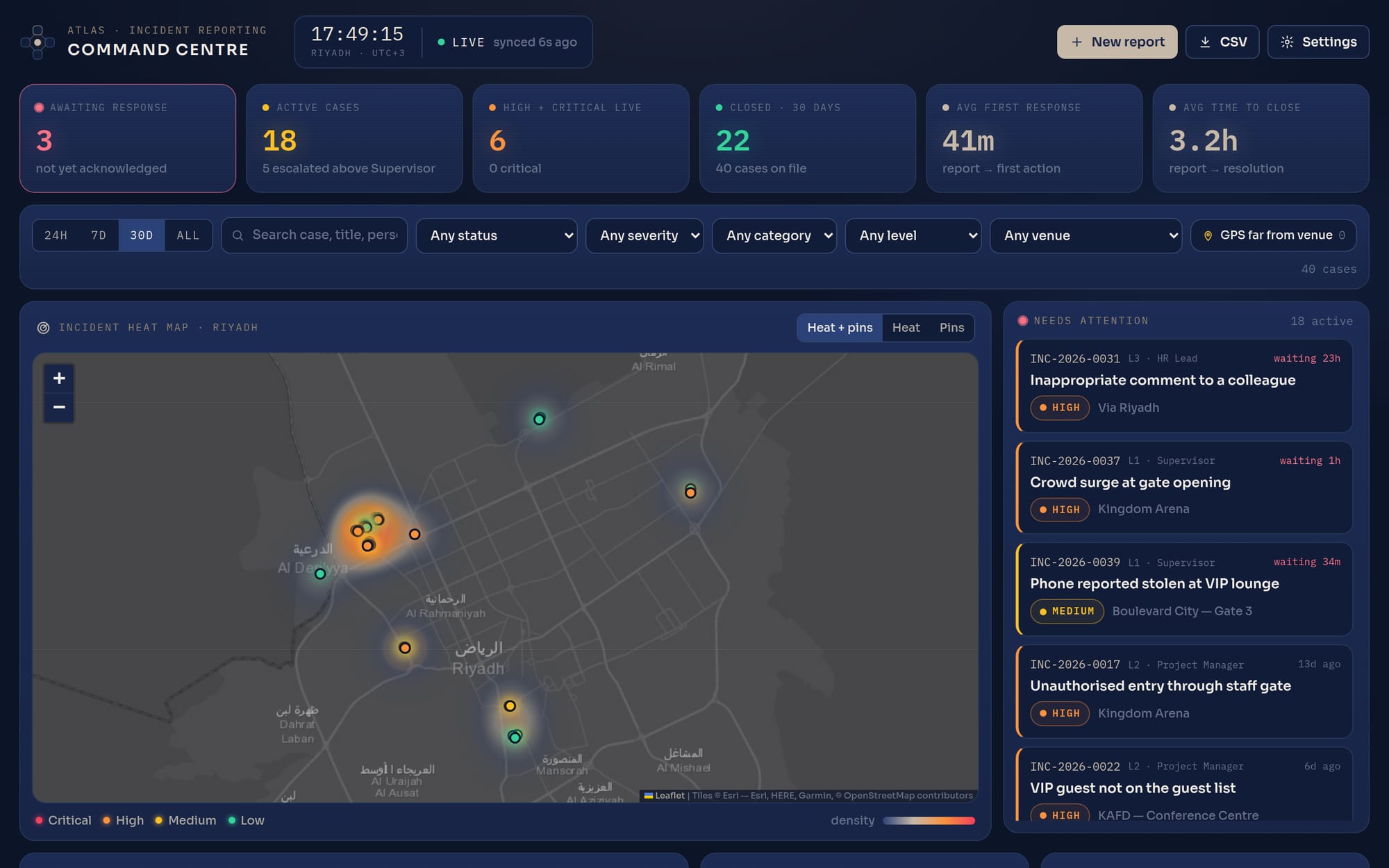
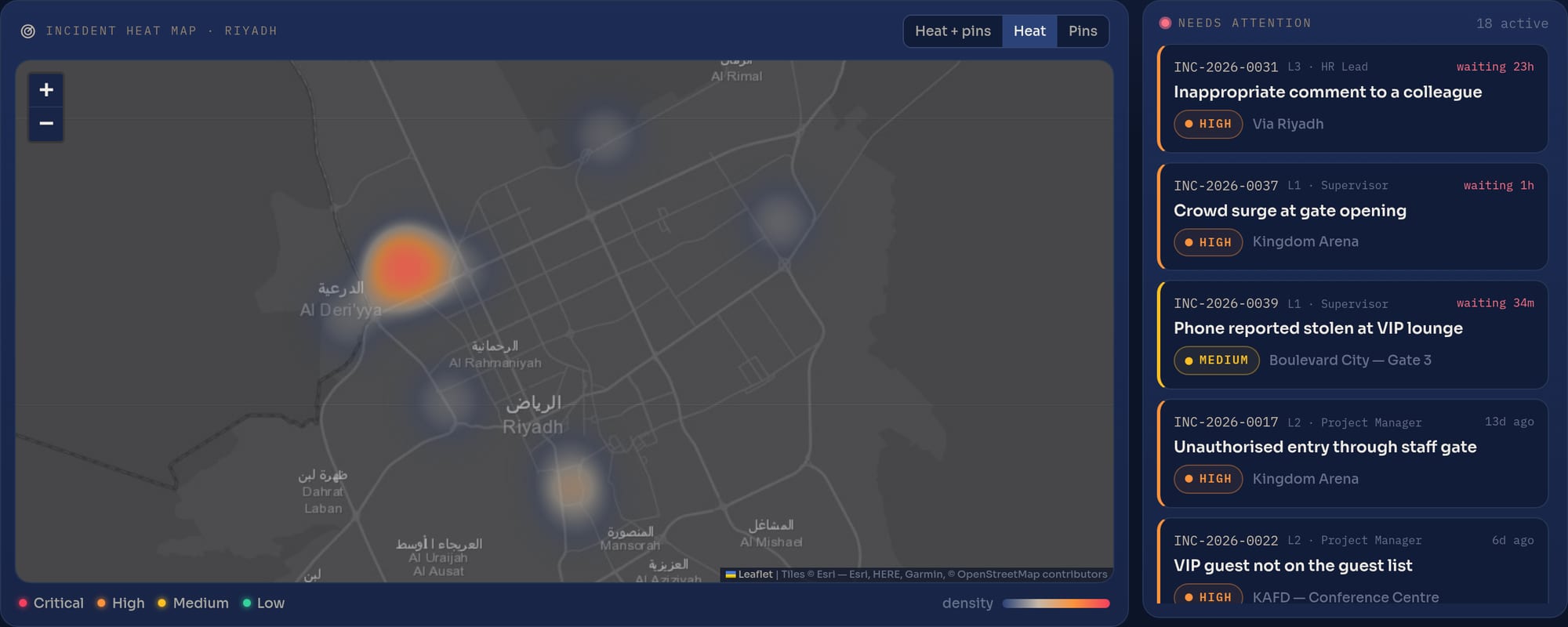
  • One live screen. Heat map of where incidents cluster, a needs-attention feed, response times per level, PDF case reports and CSV export.
Incident heat map over Riyadh in the Command Centre
See the full report.Atlas showcaseEvery screen, the escalation emails, offline reporting and a downloadable brochure.
Why Atlas

Built by an events team, for event days.

Atlas was not designed in an office for a generic workforce. TBP built it to run its own crews on Saudi events, and it is shaped by what goes wrong on the day.

Phone first

Every page works on the phone in a supervisor's pocket. Nothing to install, nothing to train.

Made for Saudi venues

Saudi time everywhere, your real venues and shift patterns, and pages that hold up on a weak venue signal.

You see what matters

Clients get their own pages: the team, the approvals, the ratings and a timesheet copy they can verify. Internal notes stay internal.

People behind the platform

TBP's staffing and operations team uses Atlas every day and supports your event from planning to wrap-up.

How we start

  1. Walk-through. We show you the products on sample data, on your own phone.
  2. Set-up for your event. Venues, roles, shift patterns, reviewers and escalation contacts.
  3. Your team page. The proposed crew, ready for your approval.
  4. Event day and after. Check-ins and the live board, incident reporting, the evaluation link and a verified timesheet at month end.

Set up with you at rollout

  • Logins for your reviewers, supervisors and managers, including view-only access
  • Your venues and check-in areas, roles, shifts, categories and response targets
  • Arabic interface for staff
  • Your branding and your own web address

Scope and timing are agreed per project.

Bring Atlas to your next event.

Tell us the event, the dates and the team you need. We'll walk you through crew.Atlas, at.Atlas and report.Atlas on sample data and show you how your event would run on them.

ContactTBPStaffing@TBP.me